

The machines in the SAECO Lirika range, like other models in the SAECO range, have a display which simply and effectively expresses the status of the machine using a very simple color code:
- Green: RAS
- Orange: Action in progress or information requested
- Red: Customer action or after-sales service required
However, it is important to understand these symbols carefully to ensure proper maintenance and maintain the good performance of your LIRIKA machine.
If you need parts for your machine, consult our dedicated section by clicking on the image:

|
|
MACHINE PRIMING:The machine is performing a circuit priming cycle, wait…This occurs when commissioning or after descaling . |
 |
MACHINE RINSE:The Machine is in the rinsing phase. Wait until the machine has completed the cycle. Occurs when starting or switching off the machine (automatic or manual). Rinsing is very important to clean the hydraulic circuit with hot water and degrease the nozzles. |
 |
HEATING: Machine in the heating phase, which occurs just after rinsing during start-up, or when you request hot water or steam. |
 |
MACHINE READY: The device is ready for operation.Some models have a button allowing you to adjust the quantity of coffee by successive presses, allowing you to vary the intensity of coffee ground by the automatic grinder. |
 |
COFFEE IN PROGRESS: The machine brews coffee, Coffee dispensing stops automatically when the set level is reached; However, it is possible to interrupt coffee delivery by pressing the button at the top left (STOP) |
 |
DOUBLE COFFEE:The machine brews two coffees, one after the other. Coffee delivery stops automatically when the set level is reached; However, it is possible to interrupt the delivery of coffee by pressing the button at the top left (STOP). |
 |
STEAM:The machine either diffuses steam depending on the button selected. To stop the flow, press the top left button (STOP). |
 |
HOT WATER:The machine delivers either hot water depending on the button selected. To stop the flow, press the top left button (STOP). |
 |
LACK OF WATER: Fill the water tank to be able to use the machine. there is still water in the bottom of the tank to avoid defusing the device. |
 |
FILL COFFEE :Fill the bean tank with coffee beans and start a coffee again. |

 |
GROUNDS BIN:Empty the grounds drawer. Be careful, opening the door resets the counter , it is then imperative to empty the container, otherwise you risk clogging the device. |
 |
COFFEE GROUP :The distribution group must be inserted into the machine or the sensor detects that it is incorrectly inserted in its housing. Remember to clean it regularly by following the instructions. |
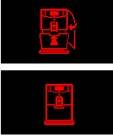 |
DRAWER AND SIDE DOOR:Insert the drip tray and the grounds drawer into the machine, then close the service door. This light can sometimes come on if your machine is not positioned correctly. |
 |
DESCALING :The machine requires a descaling cycle. With this message,you can continue to use the machine but you risk compromising its proper functioning quite quickly, especially if the water is hard. We remind you that any breakdown caused by lack of descaling is not covered by the warranty, and risks generating significant costs outside of the warranty. Order SAECO descaler from MAPALGA. No vinegar for descaling, in fact its concentration of acetic acid can damage the joints and metal components. The descaler recommended by SAECO contains a corrosion inhibitor and is adapted to the capacity of the boiler and the hydraulic circuit. For difficult cases prefer 500 ml. Descaling procedure according to model: LIRIKA BLACK (black) LIRIKA PLUS (grey) |
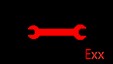 |
DEFAULT:The machine reports a fault. Turn off the machine. Turn it containerk on after 30 seconds. Try this action 2 or 3 times as interference may cause a false signal. If the signal appears again, contact the point of sale and communicate the code highlighted on the display, example error 1. |
Need coffee beans?
Order from MAPALGA with 20% off your first order of bean coffee with the promo code: GRAIN
Is your machine broken?
Did you know that MAPALGA can repair it for you? to do this contact us describing the model, your problem, and give us your contact details, and we will not fail to contact you.
You can also download the LIRIKA advice sheet